

The Best Prebuilt Gaming PC in 2024! No matter what your budget is, this video will help you figure out what the right gaming PC for you is. We have reviewed and tested A TON of the most popular prebuilt gaming PCs this past year, so I’ve got some extremely helpful personal insight that’s going to help you decide which one to get. We’ll be taking you through our experience, breaking down the pricing, design and build quality, fan noise, internals, performance, gaming benchmarks, and Cinebench R23, 3D Mark Timespy, and Creative App tests! I compare every aspect of these PCs together and even compare their Price to Performance ratios, average FPS, as well as share with you what people are purchasing the most! I’ve spent an insane amount of time testing these machines this year, so I can confidently say by the end of this video, you will know which PC is right for you!
Title: The Ultimate Guide to the Best Gaming PCs for Every Budget in 2024
After an insane amount of Gaming PC reviews, here’s an update for all you PC Gamers and Creators looking for the Best Gaming PC 2023. If you only watch one of my videos this year. This is the one you NEED pay attention to. By the end of this video you will know which PCs are right for you or not. No matter what your budget is.
If you’re hunting for the ULTIMATE Gaming PC of 2023, You NEED to watch this BEFORE you buy one. We’ve reviewed a LOT of gaming PCs for you this year but if there’s ONE video you don’t want to miss… this is it. By the end, you’ll know exactly which rig suits your needs and your budget. It’s about time you take your gaming to the next level
I’m going to be talking about each one of my favorites individually, starting with the some of the most expensive and somewhat unnecessary option at $5000, all the way down to the least expensive budget friendly more reasonable options under $1000
((((during this VO please use B Roll flashing quickly through all of the pricing shots from the pricing section fast forwarding from $800 to $5000, with a quick whooshing sound effect for each one)))). We’re also going to reveal what the MOST purchased prebuilt PC this year was. I’ve collected a massive amount of affiliate link data showing me what the most popular purchases this year have been.
The latest deals are constantly changing so you’ll want to bookmark this video because my top PCs list in the comments and description will be updated every few days as well. Along with links to my recommendations for gaming monitors, mice and keyboards. We’re going to be putting all these top PCs next to each other, comparing their average FPS across a bunch of games, their Benchmarks for content creation, temperatures, fan noise and MOST importantly their price to performance ratios. We’ve spent a ridiculous amount of time testing these PCs for you this year, so sit back, relax and enjoy the fruits of our labor in this ULTIMATE 2023 Prebuilt Gaming PC comparison. (((((zoom into B Roll))))
CLX Ra – $5000
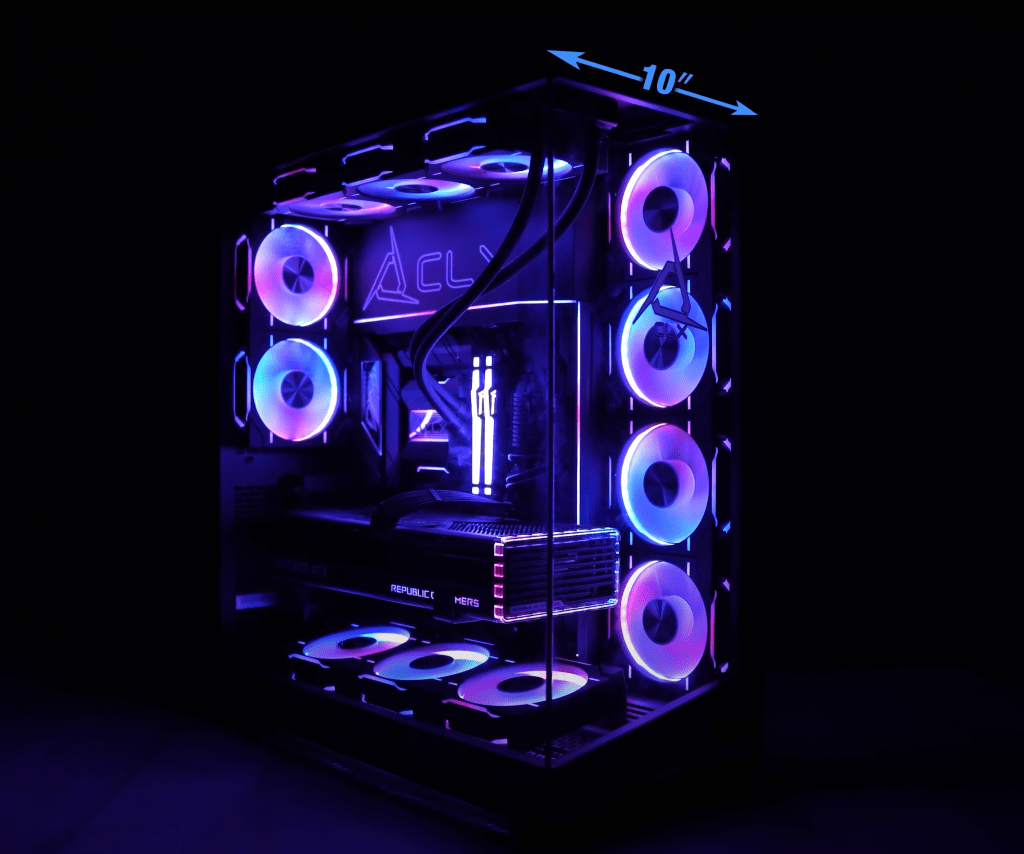
The Most Expensive option Award this year goes to this CLX Ra that I just reviewed. This PC is Beautiful and was specced out with some insanely powerful components. With ours we got the all new AMD Ryzen™ 7 7800X3D CPU and a 4080 GPU in the massive Phanteks NV7 case stacked with 12 fans. CLX is a fully custom system integrator which means you’ve got a crazy amount of options for every part that goes into the computer. And then it even gives you multiple options if your selections result in compatibility issues. I’ll show you the performance of all these computers here in a sec. This type of customizability without building it yourself is only for those with deep pockets though. I specced out all these parts individually and you’re being charged a $1400 markup vs going the DIY route. The CLX Ra was a great PC and performed very well, but it’s the only one on this list that I only recommend for people with deep pockets where money is no object. If you specced it out with the Best CPU in the world right now (the new Ryzen 9 7950X3D CPU) and the best GPU, the 4090. You’re looking at 5500 with a custom CLX build
Corsair Vengeance i8100 – $4200
The version of this computer I tested is still sitting around 4500 but since then the new AMD 3D CPUs have been released and the slightly faster AMD version is only $4200. Which is surprising because it’s actually a MORE Expensive CPU. The i8100 is another beautiful PC and it’s my personal favorite that I’ve reviewed so far. It just doesn’t have the best price to performance ratio as you’re about to see later in this video. The design of this case was really well thought out and looks incredible. 10 RGB fans total, 6 customizable LED strips accenting the edges of the case and peaking through sci fi looking vent holes
Corsair Vengeance i7400 – $3800
This one USED to be my favorite before the Vengeance i8100 came out and is still one that I like a lot! This computer was THE most requested review that I have ever had on this channel. And it did not disappoint when I finally got to it. I personally like the design, larger case, and easier upgradability of the i8100 a little better but you will probably have a different opinion (if money matters to you) after we show you the price to performance ratios. Design wise it does feel a bit more basic, but I’ve been seeing more and more comments from people who prefer a less sci fi looking gamer design. For the past two years Corsair has ranked at the top on this channel, not only due to their choice of NON proprietary parts like HP, Lenovo, and Alienware, but because they stand by their computers with a 2year warranty vs only a 1 year from almost every other computer brand. If you want to save $100 and build this PC yourself, Corsair also sells this DIY Build kit that actually comes with a slightly better motherboard. A kit like this is an excellent way to break into the somewhat scary world of DIY as these kits also include their 2 year warranty and everything included is guaranteed to be compatible.
NZXT BLD – $3800
The NZXT BLD is next on my list of favorites and what I really like about this one, is that I was able to choose all of my parts just like I did with CLX. There’s not AS many custom options as you have with CLX but the NZXT BLD is a MUCH better bang for you buck and the design and overall quality was top notch. NZXT just like Corsair also boasts a 2 year warranty on their PCs as well. I chose the best of the best options and for that.. Just over $3800 is not bad for a maxed out PC like this. I tested the i9 4090 version as well as the i7 4080 version. But you can fine tune YOUR selection based on your personal preference and budget as well.
HP Omen 45L – $3100
Now for just over $3000 you can get the HP Omen 45L also with an i9 and 4090! It’s nearly just as fast as these Corsair Vengeance PCs with the same specs and your about to see in a second how incredible it’s price to performance ratio is. This one is uniquely designed with something called a cyro chamber that’s dedicated to keeping the CPU cool. Honestly kindof a gimmic though because you’ll see it didn’t show any real advantage over the competition. And you’ll see more of what I’m talking about when we get to the thermals. HP is currently the only OEM (Original Equipment Manufacturer) that I’m currently recommending and that’s mainly due to the price. OEMs like HP, Lenovo, and Alienware tend to use their own versions of the Nvidia GPUs and their own custom motherboards and often non modular power supplies.
CyberPowerPC Gamer Supreme – $2600
If that one is still outside of your budget, then this CyberPowerPC Gamer Supreme with a 13th Gen i7 and 4080 for only $2600 . This one I haven’t done a FULL review on yet but I plan to in the near future. My experience in the past with CyberPowerPC though is pretty positive. Usually one of the best bang for your buck Gaming PCs you can find BUT they do also tend to run a little hotter than most. So keep that in mind. I personally don’t mind a hotter PC if I’m going to get higher performance for my money.
Skytech Azure 2 – $2000
For UNDER $2000, I highly recommend the Skytech Azure 2 that I reviewed. You are going to be blown away when I show you how this one ranks on my Price to Perfomance chart. But spoiler alert.. This PC is actually FASTER than the top tier i9 3090 PCs I reviewed last year. And those were double the price of this one. If you can swing it, for $400 more you can get it with the much more powerful 4080 GPU for about 20% higher performance ((Affiliate links to all these PCs in description below))
CyberPowerPC Gamer Xtreme – $1500 – $1000
For around 1500. I would go with the new CyberPowerPC Gamer Supreme with a 13th Gen i7 and 4060Ti. Closer to $1000, I’d get it’s little brother CyberPowerPC Gamer Xtreme with a 13th Gen i5 and a 4060 GPU and 16GB of DDR5 RAM. In all my tests most games dont even use THAT much. Honestly unless you are a content creator anything over 32 is a waste of your money. This is a great deal for a gaming computer with these specs. This is another one that I plan to be doing a full review soon as well. At this level, I do want to warn you not to expect to be able to crank graphic settings up or play in 4k with a decent frame rate.
Victus by HP – $770
For under $1000 at only $700 I recommend the Victus by HP with a new 13th Gen i5 and then make sure to select at least the 1660 Super GPU before checkout. This is the bare minimum that I would recommend for semi decent gaming though. This is not a gaming PC for those that like to crank up the graphic settings or game in 4k if you want a semi decent frame rate and responsiveness. If you’re coming from a console like th PS5 or Xbox Series X and you want the graphics to at least match that, then you would need to select a 3060 for $120 more, bringing the total to 770. Yes that is technically $270 more than a PS5, but the PS5 is locked and not upgradable, has way less games than a PC, a shorter lifespan than a PC, a way smaller library of games and not nearly as backwards compatible as a PC, and games can’t be modded on the PS5 like they can on PC. Customizing your graphic settings is very important for gamers that want to fine tune their visual preferences vs their need for higher frame rates.
Fan Noise
Ok so enough with the backstory on each of these machines! Let’s get into the exciting part. Comparing ALL of them next to eachother
Here’s how they all compared to each other when it came to fan noise. Most of them were not that loud but you can see at the bottom if you want the quietest, the CLX Ra, Lenovo Legion 7i Gen 8 and Corsair Vengeance a7300 are your best bet.
Thermals
As Far as temps go. I did a lot of very thorough testing inside and outside of all of these and crunched all of this data into a master chart (please show a bunch of shots of different computers with the thermal imaging testing that I did as B Roll while I’m saying this). Here’s our Average temps across 9 games for each PC at 1080p gaming with the Highest graphic presets. We organized this chart by the CPU because 1080p gaming puts a lot of pressure on the CPU and not as much on the GPU. Here you can see the 13th Gen i5 version of the Skytech Azure was by far the coolest CPU that we’ve seen yet. The second is the AMD CPU on the a7300 and the coolest 13th Gen i9 we’ve seen belongs to the Lenovo Legion 7i Gen 8. Things changed a bit when we stepped it up to 4k gaming though. I organized this chart by the coolest GPU this time since High Resolution gaming is very heavy on the GPU and you can see again that the CLX Ra we tested had the coolest GPU temperatures out of all of them. The Corsair Vengeance i7400, Skytech Azure 2 and both NZXT machines also kept their GPUs impressively cool. The 4090 GPU was kept THE coolest in the NZXT BLD with ALL of the similar spec Corsair Vengeance PCs not far behind. You definitely do not want to run your GPU too hot for too long as that will shorten the overall lifespan of the most expensive part of your PC. So these prebuilts that kept their 4090s under 60 degrees Celsius (AVERAGE) will certainly give you a little more peace of mind.
Performance
Now the part I know you guys are the MOST curious about.. Performance. And right after that the Price to Performance Ratios. The first popular benchmark PC Mark 10. They self defined to “measure complete system performance for modern office needs using tests based on real-world applications and activities”. My personal favorite, the Corsair Vengeance i8100 had the best score by far here. Cinebench R23 which is a great benchmark for 3D Rendering capabilities, the top 3 machines you’ll want to keep in mind are the Skytech Eclipse, Lenovo Legion 7i Gen 9, and of course the Corsair Vengeance i7400.
Another Popular rendering software is Vray. With their benchmark system you can again see that the Corsair Vengeance i8100 topped the charts, followed by the Legion 7i Gen 8, Skytech Eclipse and Corsair Vengeance i7400.
For those of you that use blender, these were the scores we got with their benchmark. Again the top specd Corsair Vengeance PCs and Skytech Eclipse ranked in the top 5. Even when stepping down to i7 4080 Configurations, the i7400 was still the best performer in that category for 3D Rendering. (Blender Comparison Charts are shrunk to be thinner now so that they can both fit on screen side by side)
The last creative benchmarks we always do before we get into gaming, are the Puget Benchmarks.
For Davinci Resolve, surprisingly the top specced i9 4090 version of the Skytech Eclipse did the best. Followed by the usual Vengeance PCs.
Similar results with Adobe Premiere as well, except the HP Omen 45L stepped it up to 2nd, performing very well.
Photoshop, the usual winners here. But honestly, you don’t NEED a superfast PC for photoshop. Editing software like Premiere and Davinci you definitely do though. The faster the better. And the more RAM you have the better. I recommend at least 32GB for editing software. But ideally I suggest 64GB or higher for 4K editing.
After Effects is another resource heavy Creative App.
And for this benchmark, the HP Omen 45L dominated with a pretty healthy margin when it came to motion graphics editing and designing.
For 3D Mark, which is a great benchmark used to determine a computer’s overall gameability, the custom top specced NZXT BLD machine topped the charts here. Followed again by the Corsair Vengeance PCs. And again the lower specced i7 4080 version of the NZXT dominated in that category as well.
The part that we’ve spent the most amount of time this year on are the actual gaming benchmarks. We averaged the fps of 6 different games at 3 different resolutions for each PC to give us the best overall perspective on gaming performance.
At 1080p gaming the very expensive CLX Ra performed quite a bit above the rest. 1080p gaming is more CPU bound so it makes sense that a PC with one of the best CPUs you can get right now (the AMD Ryzen 7 7800X3D) did the best
At 1440p though, the i8100 dominated the charts and not far behind the Legion, NZXT and i7400. The lower speced i7 4080 version of the Corsair Vengeance i7400 performed the best in that category as well.
And then at 4k the top 5 PCs were neck and neck with the i7400 just baarrely at the top. By 1 average fps.
Looking down further on the charts is such an encouraging exciting thing to see.. It’s a great time to be getting a gaming PC because you can see here that this year’s Skytech Azure 2, at only $2,000 actually outperformed last years BEST and fastest PCs with i9s and 3090s. Those PCs used to be double that price at $4,000 last year.
Price to Performance Ratios
Now the FUN graphs. But also probably the most important ones. Price to Performance Ratios.
And the Pie charts showing you guys what everyone ended up buying this year.
When dividing the price of each PC by it’s overall average gaming fps you can see that you actually usually get a better bang for your buck the lower you go in power. Basically you get taxed for wanting the best of the best extremely fast PCs. Last year’s CyberPowerPC Gamer Xtreme with only an i7 and 3060Ti actually topped our charts for the price to performance ratios. But I recommend at least the Skytech Azure 2 which had the second highest dollar per FPS ratio and way way faster.
At 1440p it actually took the #1 spot overall. The i7 4080 version of the Corsair Vengeance i7400 moved up to 3rd place at this resolution.
And then when maxing out the graphic settings at 4k gaming, the PC that absolutely dominated here was the HP Omen 45L. What’s even more impressive is that this is actually a top specced machine with a 13th gen i9 and 4090. The CPU was power limited just a little bit on that PC which held it back slightly in lower resolution gaming but as you can see here it incredibly performance at 4k led it to be the best value you can find at high resolution gaming. Because of that incredibly aggressive price drop.
The MOST Purchased Gaming PCs This Year
So what has everyone been buying so far after clicking on my links?
My consolidated stats across all of my affiliate links shows that 40% of you guys ended up going with the Corsair Vengeance i7400. 93% of those sales were for the top spec i9 4090 version! That one was my at the beginning of this year. But my new favorite this year, the i8100, only 7% of you ended up purchasing that one. Second place this year, so far has gone to the CyberPowerPC Gamer Xtreme. And more specifically the large majority of those sales were for the version with a 12th i7 and 3060Ti . The 3rd most sold was the Skytech Prism 2 with a little over 10% of the purchases.
Monitor Recommendations
I’ve also done quite a few monitor reviews lately so make sure to subscribe and check those out or if you just wanna save time and take my word for it. My absolute favorite so far was Corsair’s Xeneon Flex OLED which is a massive 45inch ultra wide that you can use flat or bend it for a very steep 800r curved screen. That one is 1500 though. My second favorite, which actually has the best picture was the slightly smaller Alienware AW3423DWF 34inched curved OLED gaming monitor at $900. A budget closer to $400, I’d go with the Samsung Odyssey G5 ultrawide curved for $400. If you just need something decent enough to get you by, then the Samsung Odyssey G51C 32″ for only 250 is what I would get.
Final Thoughts
Overall I’d say my top choice for a budget PC would actually be the new CyberPowerPC Gamer Xtreme with the 13th Gen i5 and 4060 GPU. Those are some killer specs for only a little over $1000. Bare minimum I would go is that Victus by HP 15L with a 3060 for $770. Mid range, that Skytech Azure 2 is an insane deal for $2000. For the higher end, I recommend the HP Omen 45L more than the Corsair Vengeance PCs now because of the MAJOR recent price drop. My personal favorite this year has been the Corsair Vengeance i8100 if money is no object but I think for the majority of you looking for the best AND find a lot of value in a 2 year warranty, then you’ll be happier with the Corsair Vengeance i7400 over the HP Omen 45L. But you’ll be paying quite a bit more for that over the HP Omen 45L, so that’s why my ultimate recommendation for everyone right now who wants the fastest gaming PC that is the closest to $3000, I recommend the HP Omen 45L.
If you do decide to purchase this machine or one of the others that I mentioned, I would really appreciate it if you purchase through one of my affiliate links in the description and comments below as the small commission I get from those sales at no cost to you. It is a major part in keeping this channel going and getting better and better for you. I’d also like to personally thank all of my members for their monthly support of this channel. I really appreciate you guys. Every little bit helps. If you’d like your name here in all of my videos as well as other perks, please consider becoming a channel member by clicking on the join button below.
And remember every week I do a giveaway that randomly selects someone who’s interacted with this channel or filled out the form in the description, so make sure to like, comment, and subscribe with notifications turned on to stay up to date with that as well as staying up to date with all my latest gaming PCs. And the winner for this week is…… Thanks for watching guys, I love you guys, God bless.
- Pricing/Availability of all computers compared:
Origin PC Genesis – https://bit.ly/Origin-PC-Genesis
(NEW) Corsair Vengeance i7500 – https://geni.us/CorsairVengeance-i7500 (Most Popular)
Corsair Vengeance i7400: https://geni.us/CorsairVengeance-i7400 (Old version)
(NEW) Corsair Vengeance i8200 – https://geni.us/CorsairVengeance-i8200 (My Favorite)
Corsair Vengeance i8100 – https://geni.us/CorsairVengeance-i8100 (Old Version)
Corsair DIY Build Kits – https://go.corsair.com/MmyzzN
CLX Ra: https://clxgaming.refr.cc/JustinTechTips - Around $3000 and under
Alienware Aurora R16 – https://geni.us/Alienware-Aurora-R16
HP Omen 45L – https://geni.us/HP-Omen-45L
CyberPowerPC – Gamer Supreme (i7) (4080) https://geni.us/CyberPowerPC-i7-4080 - Around $2000 and Under
Skytech Azure 2 (get this better version instead) – https://geni.us/Skytech-Azure-2-AMD
CyberPowerPC Gamer Supreme https://bit.ly/CyberPowerPC-7800X3D - Around $1000 and Under
Victus by HP 15L (13th i5)(3060) – https://geni.us/Victus-by-HP-15L
CyberPowerPC Gamer Xtreme (i5) (4060): https://geni.us/CyberPowerPC-i5-4060 - My favorite monitor right now and the one I use now as my personal main monitor is the new LG UltraGear OLED https://geni.us/LG-UltraGear-4k-OLED
- Please consider buying something from one of my Affiliates in the description and comments to help support the channel:
After clicking these links ANY purchase within 30 days helps me recieve a commission at no cost to you!
- Amazon – https://amzn.to/3J5rGOL
- Best Buy – https://bestbuy.7tiv.net/LPmVYM
- Corsair – https://go.corsair.com/VmOzaA
- HP – https://tidd.ly/3GWb3mI
- Dell (Alienware) – https://bit.ly/Dell-Shop
- Lenovo – https://geni.us/LenovoPCs
- Skytech – https://skytechgaming.com/?ref=justintechtips
- CLX – https://clxgaming.refr.cc/JustinTechTips
- OriginPC – https://geni.us/OriginPC

 Just!N Tech
Leave a comment